"Do we need an app?" is one of the first questions business owners ask us, and the honest answer is often "not yet". A website, a progressive web app (PWA) and a native mobile app solve different problems, and choosing the wrong one wastes months. This guide compares them in plain language and gives you a simple way to decide.
Key takeaways
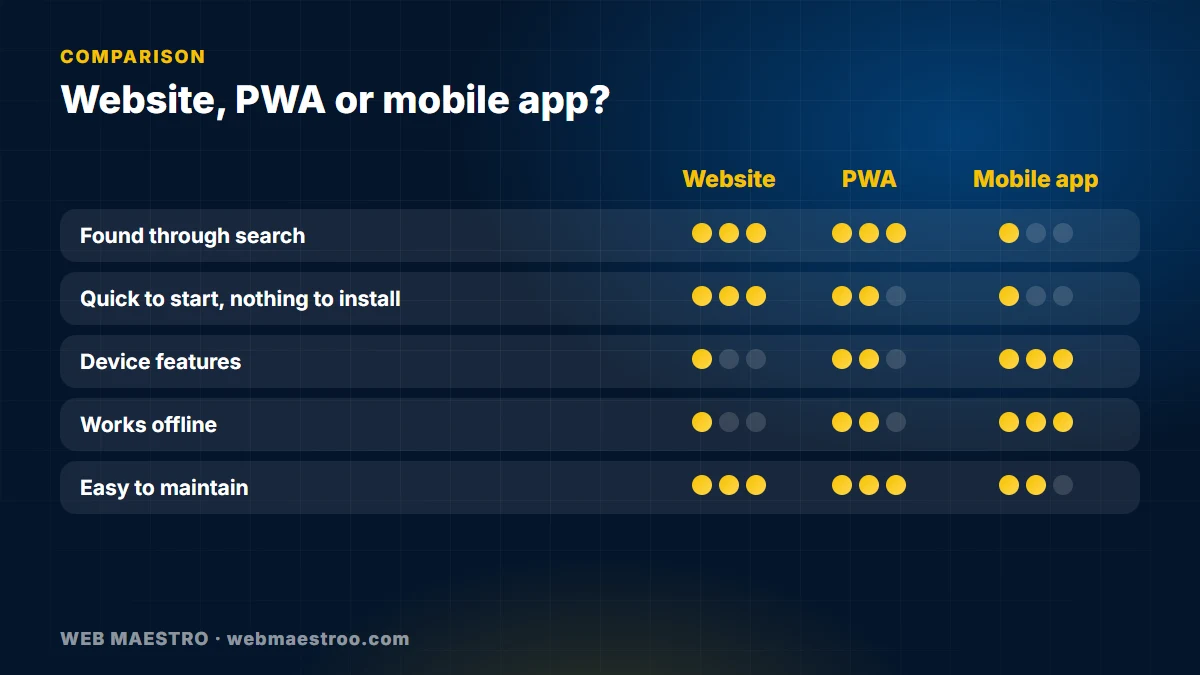
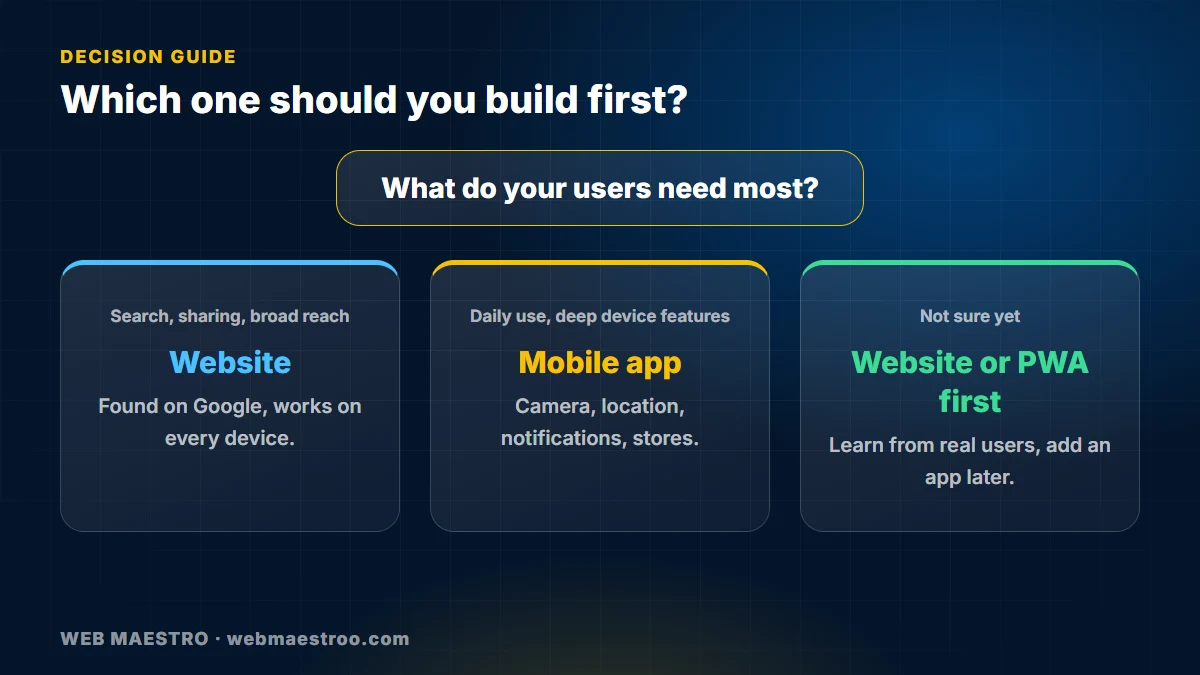
- A website is the right starting point for almost every business: it is found through search and works on every device.
- A PWA is a website that can be installed and can work in part without a connection.
- A native or cross-platform app is worth it when you need deep device features, frequent use or a store presence.
- Decide by what your users do, not by what sounds modern.
- You can start with a website and add an app later without starting over, if the backend is planned well.
The three options in plain words
- Website. Opens in the browser, found through Google, shared by a link, nothing to install. One codebase serves phones, tablets and computers.
- Progressive web app (PWA). A website with extra abilities: an icon on the home screen, a full-screen experience and limited offline use. Support for some features differs between iPhone and Android.
- Mobile app. Installed from the App Store or Google Play. It can use the camera, location, notifications, sensors and storage more deeply. It can be built natively for each system, or with a cross-platform framework that shares most of the code.
When a website is enough
Choose a website when people mainly need to find you, read about you, compare services, book, order or contact you. Search visibility matters, content changes often and users will not return daily. Most service businesses, clinics, agencies, shops and company profiles fall here, and a fast, well-built, mobile-first site gives the best return.
When a PWA makes sense
A PWA is a good middle step when you already have a website and want a more app-like experience without store approval: a dashboard, a booking tool, a catalogue or an internal tool. It is easier to maintain because it remains one product. Check carefully which features you need on iPhone, since some capabilities are more limited there.
When you need a real app
Build an app when at least one of these is true:
- Users open it often, for example daily orders, tracking, learning or messaging.
- You need strong device features: background location, Bluetooth, advanced camera use, reliable push notifications or full offline work.
- Being in the app stores is part of how customers trust or find you.
- The product is the app itself, such as a delivery, booking or on-demand service.
Native or cross-platform?
Native development (Swift for iOS, Kotlin for Android) gives the most control and performance but means two codebases. Cross-platform frameworks such as Flutter or React Native share most of the code between iOS and Android, which usually shortens delivery and simplifies maintenance, and they fit the majority of business apps. Native is worth considering for very demanding graphics, heavy hardware use or when a platform feature must be used the day it launches.
Questions to answer before you decide
- What is the one thing a user must be able to do?
- How often will they do it?
- Do they need to find you through search first?
- Which device features are essential, and which are nice to have?
- Who will maintain it, and how will you handle updates and store reviews?
- Can a first version prove the idea before you build everything?
Plan the backend once
The smartest approach is often a shared backend and API. The website, a future PWA and a mobile app can then all use the same accounts, data and business logic. Starting with the website lets you learn from real users, then add the app with far less rework.
Arabic, English and local needs
If your customers use both languages, plan right-to-left layouts, translated content and local payment and delivery options from the first version. These are expensive to retrofit.
Frequently asked questions
Is an app better than a website?
Not by default. An app suits frequent use and device features; a website suits discovery and broad reach. The best choice depends on what your users do.
Can a website work like an app?
Partly. A PWA can be installed and can work offline in limited ways, but it cannot do everything a native app can, especially on iPhone.
Do I need both an iOS and an Android app?
Often yes, because customers use both. A cross-platform approach lets you serve both from one codebase.
Will an app help my Google ranking?
An app does not rank like a web page. If search visibility matters, you need a website with good content and technical SEO.
Can I start with a website and add an app later?
Yes. If the backend is designed with an API from the start, the app reuses it and you avoid rebuilding the core.
How do I decide if I am still unsure?
Start with the website or a PWA, watch how people use it, and build an app when real usage shows the need.
Next step
Want a clear recommendation for your idea? Contact us or explore our mobile app development and web development services.
This article is no longer available. Back to blog